
Is Your App AI-Ready? A Practical Check for Decision-Makers
Users expect AI features in apps, and at the same time Siri, Gemini and ChatGPT are themselves becoming the interface through which apps are called. Together, the two decide whether your app stays visible and useful in the AI era. This article sets out what "AI-ready" concretely means and provides a self-test for your app.
 Thomas Henz
What does “AI-ready” mean for an app?
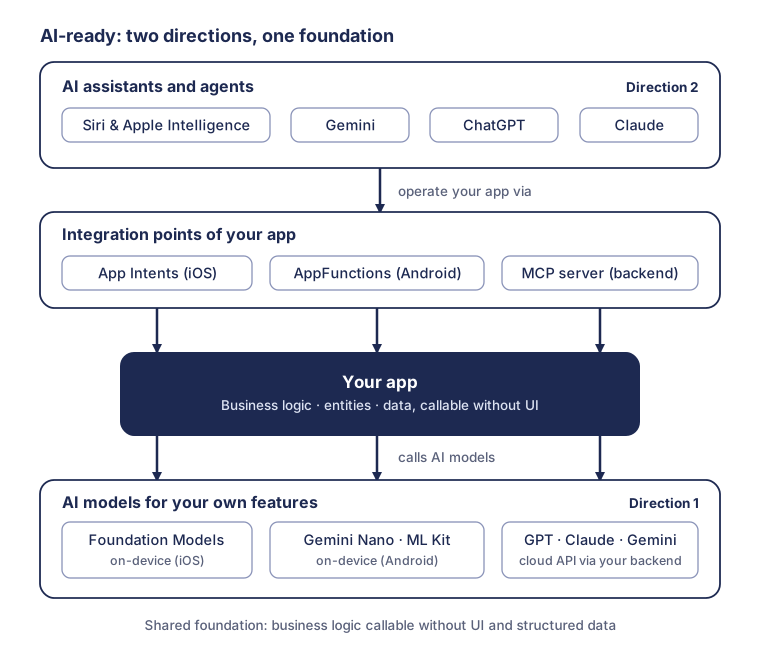
AI-ready describes an app that works with AI systems on two levels: it uses AI models to offer its own features, and it makes its functions and content available to AI systems as a tool. The first direction is familiar in the market; the second is newer and often overlooked, even though it decides future visibility.
Direction one means: the app calls models, for instance to summarize texts, read photos or classify inputs. Direction two reverses the relationship: assistants such as Siri, Gemini or ChatGPT call the app, without users opening its interface. The app remains an endpoint for humans and additionally becomes an interface for machines.
The reason the second direction is gaining priority now comes down to three platform decisions within a few months. At WWDC 2026, Apple declared App Intents the central building block of the new, LLM-based Siri. With Android 17 (June 2026), Google expanded AppFunctions, through which Android apps provide their functions as tools for an on-device MCP. And since December 2025, OpenAI has accepted third-party apps for the ChatGPT App Directory. The Model Context Protocol, the technical bracket behind all of this, already counted more than 10,000 public servers in December 2025 according to Anthropic.
Both directions belong in one strategy, because they share the same technical foundation. This article therefore covers both: first the AI features inside the app, then the integration points for assistants, and finally the architecture and priority questions that follow from them.
How do you use AI sensibly inside your own app?
For AI features inside the app there are two routes in 2026: on-device models provided by the operating system, or cloud models via API. The choice depends less on hype than on three sober criteria: data protection, running costs and the model performance you need.
On-device, both platforms now provide a solid foundation. Apple’s Foundation Models framework (since iOS 26, 2025) gives apps direct access to the on-device LLM of Apple Intelligence: no per-request costs, usable offline, with structured output and tool calling into your own app logic. On Android, the ML Kit GenAI APIs based on Gemini Nano offer ready-made building blocks for summarization, proofreading, rewriting and image description; since 2026 a Prompt API (alpha) adds free-form requests. Typical use cases are narrowly scoped tasks operating directly on user data: reading the meter photo, summarizing a consumption history, pre-classifying a support request.
Cloud APIs from OpenAI (GPT), Anthropic (Claude) and Google (Gemini) are the route for more demanding tasks, such as domain assistants that access your own documents and data through retrieval-augmented generation (RAG). For that you pay per request in tokens, need an online connection and have to settle data protection cleanly: data processing agreements, the storage and processing location of the data, and the transparency obligations of the EU AI Act. One ground rule always applies: model calls belong behind your backend, not in the app client, for key protection, cost control and the ability to swap the model.
| Criterion | On-device (Foundation Models, Gemini Nano) | Cloud API (GPT, Claude, Gemini) |
|---|---|---|
| Running costs | no per-request costs | cost per request (tokens) |
| Data protection | data stays on the device | data processing and data flow to be settled |
| Offline capability | yes | no |
| Model performance | compact models for narrowly scoped tasks | most capable models, RAG on your own data |
| Device base | only newer devices with AI hardware | all devices |
| Maintenance | model updates come with the operating system | model choice and versioning in your own backend |
In practice, good apps combine both routes: on-device for fast, private standard tasks, cloud for the cases where model quality makes the difference. What AI features actually fail on is rarely the model, but missing structured data and an architecture that does not separate logic from interface. That very foundation is what the second direction needs as well.
How does your app become a tool for Siri, Gemini and ChatGPT?
For AI systems to operate your app, it needs defined integration points. In 2026 there are four: App Intents on iOS, AppFunctions on Android, an MCP server at the backend, and a ChatGPT app for a presence in OpenAI’s assistant platform.
The Model Context Protocol (MCP) is the technical bracket here. MCP is an open standard that connects AI applications to external tools and data sources in a uniform way; requests and responses follow a defined schema, so that any MCP-capable client can use any MCP server. Anthropic published the protocol in November 2024 and handed it over to the Agentic AI Foundation under the Linux Foundation in December 2025; the current release candidate of the specification carries the date 2026-07-28. ChatGPT apps build on MCP technically, and Google’s AppFunctions carry the same idea over to Android as an on-device variant.
An overview of the four integration points, with an honest maturity level as of August 2026:
| Integration point | Platform | Status (August 2026) | Typical use |
|---|---|---|---|
| App Intents | iOS, iPadOS, macOS, watchOS, visionOS | production-ready since iOS 16 (2022); per WWDC 2026 a building block of the new Siri | Siri, Spotlight, Shortcuts and widgets operate app functions |
| AppFunctions | Android from version 16 | preview: Jetpack library in alpha, Gemini integration in private preview (May 2026) | Gemini executes app functions directly on the device |
| MCP server | backend, platform-independent | specification: release candidate 2026-07-28; broad client support (ChatGPT, Claude, Gemini and others) | assistants and agents access your service |
| ChatGPT app (Apps SDK) | ChatGPT | submissions open since December 2025, App Directory live, SDK in beta | interactive app experience directly inside ChatGPT |
You will find the technical depth on the two device interfaces in our deep dives on App Intents and AppFunctions. In addition: even without an interface of your own, it is already being decided today whether ChatGPT and its peers know and recommend your product. How to optimize your landing page and store presence for that is covered in our article From SEO and ASO to GEO.
Is your architecture ready for both?
The bottleneck on the way to an AI-ready app is rarely the individual framework, but an architecture in which core logic is only reachable through the user interface. Assistants call functions without a UI; that is the shared requirement behind App Intents, AppFunctions and MCP, and it matches what clean AI features inside the app need. Four building blocks decide it.
Business logic without UI. On the device this means: core functions live in their own package shared by the app and its extension, so that intents and functions can run in the background. In the backend it means API-first: every function the app can perform exists as a documented endpoint.
Clean entities. Assistants work with your data objects: “the contract”, “the last invoice”. These objects need stable IDs, clear properties and ways to search them. Anyone whose data model only exists implicitly inside views has the actual work still ahead of them.
Structured content. Content that is meant to feed web, app and assistants at the same time belongs in an API-first source rather than in page templates. Our article One content source, every channel explains why.
Auth and control for agents. When machines trigger functions, you need a clean permission concept (the MCP release candidate 2026-07-28 aligns more closely with OAuth), logging, and a deliberate decision about which actions an agent must never carry out without confirmation, such as payments or cancellations.
Record these requirements early in the requirements document; they are cheaper to implement when they are considered from the start. The technology choice also influences the path there; our article PWA vs. native apps: pros and cons provides an orientation.
How AI-ready is your app? The self-test
Six questions determine where your app stands. Every question you answer with no marks a concrete work package; the order roughly matches the sensible order of work.
- Can your most important core function be executed without an interface? A test question for your team: could “submit meter reading” be triggered today from an extension or through an API call, without the app running in the foreground?
- Are your central data objects defined as entities? Stable IDs, named properties, search by criteria: the foundation for App Intents, AppFunctions and MCP alike.
- Is there a documented, versioned backend API with an auth concept? It is the precursor to every MCP server and every ChatGPT app.
- Have you checked whether Apple offers an App Intent schema for your category? Schemas, for instance for task management, photos or email, are the route with the best effort-to-benefit ratio into Siri and Apple Intelligence.
- Do you know which user workflows would measurably benefit from AI? Summarizing, extracting, classifying: and is the data needed for that available in structured form?
- Does ChatGPT find your product when someone asks about your category? Ask it about the best app for your use case as a test and check whether and how your product shows up.
Four to six yes answers: you are ready for the concrete interfaces. Two or three: architecture first, features second. None or one: start at the foundation, not with the Siri integration.
Where should you start?
The sensible order depends on the type of your app; three starting points cover most cases.
B2C app with an iOS share: start with App Intents. The framework is production-ready, and the same work immediately pays off in Spotlight, widgets, Shortcuts and the Action button, regardless of how quickly the new Siri reaches all users. You then transfer the selection of functions to AppFunctions; their preview status argues for preparing rather than waiting.
Service with a web and backend focus: start with an MCP server on top of your existing API. It makes your service usable for several assistants at once and is the technical basis on which a ChatGPT app with its own interface can build.
Content- or commerce-driven offering: start with GEO, that is, visibility in AI answers, because it takes effect immediately and without new interfaces. Agentic checkout is worth watching: at launch, ChatGPT apps may only sell physical goods through external links (as of December 2025); in parallel, OpenAI is establishing direct checkout inside ChatGPT with the Agentic Commerce Protocol.
A fast, low-risk entry into direction one is a single on-device feature, such as automatic image analysis or a summary, because it comes without running model costs and without a fundamental data protection debate. What matters is only that each of these starting points pays into the shared foundation rather than creating an isolated solution.
Conclusion: AI-ready is an architecture decision
Behind the buzzword sits a sober thesis: an app does not become AI-ready through a single feature, but through an architecture that separates business logic, entities and data from the interface. On that basis, AI features inside the app and interfaces for Siri, Gemini and ChatGPT are expansion stages of the same system, not separate projects. Whoever lays that foundation does not have to bet on the winner among the assistants, but buys options on all of them. And whoever waits until all previews are stable will only then be starting the homework that others already have behind them.
Frequently asked questions
What does “AI-ready” mean for an app?
AI-ready describes an app that works with AI systems on two levels. First, it uses AI models for its own features, either on-device (Apple Foundation Models, Gemini Nano) or through cloud APIs. Second, it makes its functions and content callable for assistants such as Siri, Gemini and ChatGPT, through interfaces such as App Intents, AppFunctions and MCP servers.
Does my app have to contain AI itself to be AI-ready?
No. An app without AI features of its own can be fully AI-ready if it makes its functions callable for assistants, for instance through App Intents or an MCP server. Conversely, an app with a chatbot is not automatically AI-ready if Siri or Gemini cannot trigger any of its functions. What counts is the architecture, not the visible feature.
What is the Model Context Protocol (MCP)?
MCP is an open standard that connects AI applications to external tools and data sources in a uniform way. An MCP server describes which functions a service offers; MCP-capable clients such as ChatGPT, Claude or Gemini can then call those functions. Anthropic published the protocol in November 2024; since December 2025 it has been developed further by the Agentic AI Foundation under the Linux Foundation.
On-device AI or cloud API: which fits when?
On-device models such as Apple’s Foundation Models or Gemini Nano suit narrowly scoped tasks operating directly on user data: summarizing, extracting, classifying. They incur no per-request fees, work offline and keep data on the device. Cloud APIs deliver considerably more model performance and access to your own knowledge base through RAG, but cause running costs and require a clean data protection setup. Many apps combine both.
What does it cost to make an app AI-ready?
That depends above all on the state of the architecture. If business logic is already separated from the interface and a documented API exists, first App Intents or an MCP server are projects of days to a few weeks. If logic first has to be extracted from the UI, that is where the main effort arises. A single on-device feature is usually the cheapest entry point, because running model costs do not apply.
Sources
- App Intents framework (Apple Developer Documentation)
- Foundation Models framework (Apple Developer Documentation)
- Apple Newsroom: Apple aids app development with new intelligence frameworks and advanced tools (June 2026)
- Overview of AppFunctions (Android Developers)
- Android 17 is here (Android Developers Blog, June 2026)
- The Intelligent OS: Making AI agents more helpful for Android apps (Android Developers Blog, February 2026)
- Gemini Nano and ML Kit GenAI APIs (Android Developers)
- Introducing apps in ChatGPT and the new Apps SDK (OpenAI, October 2025)
- Developers can now submit apps to ChatGPT (OpenAI, December 2025)
- Donating the Model Context Protocol and establishing the Agentic AI Foundation (Anthropic, December 2025)
- The 2026-07-28 MCP Specification Release Candidate (MCP Blog)
- Model Context Protocol: specification