
AppFunctions: How Android Makes Your App Callable for AI Agents
With AppFunctions, Google is introducing the infrastructure that lets AI agents such as Gemini call functions of your Android app directly: without UI, in the background and across apps. This article explains what is behind the API, how mature it is and which architecture decisions technical teams should be making now.
 Thorsten Wesseler
“Remind me to pick up my package at work today at 5 pm.” Until now that sentence meant: open the app, navigate through the UI, create a task. In Google’s target picture for the “agentic era” of Android, an assistant will handle this in future. To do so it calls a function of your app directly, with cleanly typed parameters and without the app being in the foreground.
The technology behind it is called AppFunctions: an Android platform API (from Android 16, @RequiresApi(36)) with an accompanying Jetpack library (androidx.appfunctions). Google describes it as the mobile equivalent of tools in the Model Context Protocol (MCP), the standard that ChatGPT and Claude integrations also use to talk to external software. Put differently: your app becomes the MCP server on the device, and agents like Gemini become its clients.
For technical decision makers this is more than another API feature. It is the answer to the question of how apps stay relevant when users increasingly interact with an assistant instead of with individual apps. In our article on GEO for apps we showed how AI assistants recommend apps. AppFunctions is the layer beneath that: it decides whether an agent can operate your app.
What AppFunctions are technically
An AppFunction is a Kotlin function that is declared via annotation as a tool for agents. The basic principle consists of three building blocks.
1. Declaration via annotation. Functions are marked with @AppFunction, data classes for parameters and return values with @AppFunctionSerializable, and the surrounding service with @AppFunctionServiceEntryPoint:
/**
 * Create a new task or reminder with a title, due time, and location.
 *
 * @param title The descriptive title of the task (e.g., "Pick up my package").
 * @param dueDateTime The specific date and time when the task should be completed.
 * @param location The physical location associated with the task (e.g., "Work").
 * @return The created Task
 */
@AppFunction(isDescribedByKDoc = true)
suspend fun createTask(
    title: String,
    dueDateTime: LocalDateTime? = null,
    location: String? = null,
): Task
2. KDoc as the API contract. The comment above the function is not internal documentation here, it is part of the interface. With isDescribedByKDoc = true it becomes the description the language model uses to decide whether and with which parameters it calls the function. Google puts it plainly on the Android Developers Blog: KDoc comments are a “compiled API asset”, and their quality directly determines the agent’s execution accuracy. Vague documentation leads to wrong calls or none at all.
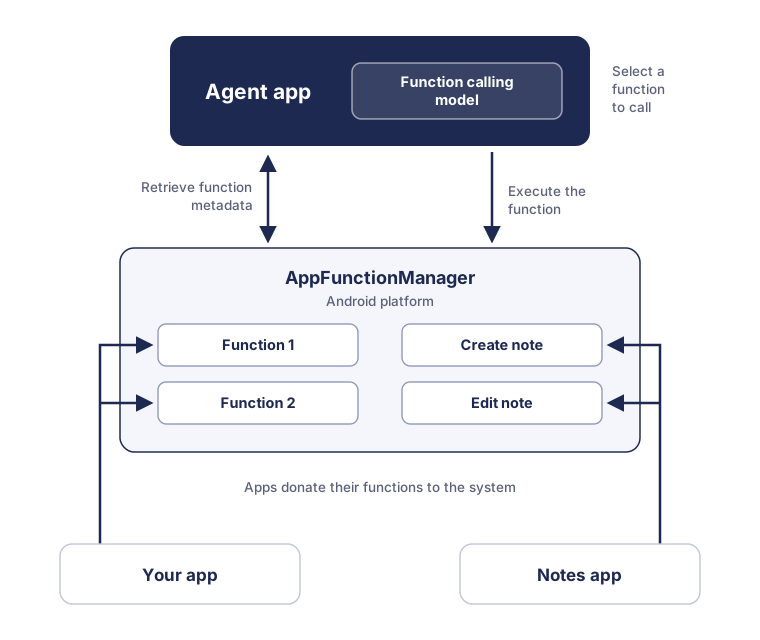
3. Schema generation and indexing. From the annotated functions, the Jetpack library generates an XML schema file that the operating system indexes. Through this central catalogue, agents discover at runtime which functions are available on the device. It works much like an MCP client listing a server’s tools.
Error handling is designed for agents as well. Predefined exceptions such as AppFunctionInvalidArgumentException or AppFunctionElementNotFoundException tell the agent in machine-readable form why a call failed. That way it can correct itself instead of failing silently.
The security model: who is allowed to operate your app?
The obvious worry is: “so now any app can call my functions.” That is exactly what Android prevents at platform level. Callers need the android.permission.EXECUTE_APP_FUNCTIONS permission to discover and execute AppFunctions at all. This permission is reserved for privileged, approved agents. Execution runs through the platform’s AppFunctionManager, not through direct app-to-app communication. On top of that, you can control per function whether it is enabled; callers check this via isAppFunctionEnabled().
Important for the governance discussion inside a company: user intent remains the trigger. The agent acts in response to a user prompt. Which functions it may use for that is something you define through your metadata and through your selection of exposed functions.
AppFunctions vs. MCP: on-device instead of cloud
Why not simply run a classic MCP server? The documentation draws the line clearly: MCP is platform independent, but typically runs as an external service with network round trips. AppFunctions are hooks at operating system level. Execution stays local on the device, with direct access to the existing app state, without additional infrastructure and with correspondingly low latency. For mobile use cases such as a user dictating a task while driving, that is the decisive difference: no backend call, no separate service management, no second auth system.
The strategic point: anyone who already thinks of their business logic as MCP tools for desktop and web agents gets the matching Android counterpart with AppFunctions, and should ideally use the same breakdown of functions.
Maturity: deliberately early, but seriously meant
Precision matters here, because AppFunctions is not production ready yet.
The API is in an experimental preview, and Google explicitly says the API surface may still change. The Jetpack library is available in alpha versions (as of July 2026: 1.0.0-alpha10). The Gemini integration has been running in a private preview with trusted testers since May 2026; for end-to-end tests, selected apps can register through an early access program. On top of that, the Android 16 minimum requirement limits the reachable device base for now.
So why engage with it now? Because the lead time is real. Identifying functions, cleanly separating business logic from the UI, establishing KDoc quality, building test processes: that is architecture work spanning several releases. Teams that only start once the Gemini integration and the API are stable will trail competitors who by then are already shipping functions that have been learned and tested. Apple is heading in the same direction with App Intents on iOS, where it is already stable today and used by Siri, Spotlight and Apple Intelligence. A cross-platform “agent surface” strategy should therefore consider both platforms together.
What technical decision makers should do now
Identify function candidates, using Google’s own criterion. Do not expose features indiscriminately, but tasks where a voice or text command is objectively faster than navigating the UI. Google’s example clusters from the documentation: creating tasks and reminders, generating playlists from a description, creating calendar entries, and cross-app chains (“find the recipe in my mail and put the ingredients on the shopping list”). Three to five high-quality functions beat twenty half-hearted ones.
Review your architecture. AppFunctions call business logic without a UI. If core functions are only reachable through activities and fragments today, that is the real conversion work: the repository layer and use cases have to be callable standalone. The code example in the documentation shows the pattern. The AppFunctionService injects a TaskRepository and works directly on it.
Establish documentation quality as an engineering discipline. Since KDoc is exactly what the model reads, function descriptions belong in code reviews, including example values in the parameter descriptions, the way Google demonstrates it.
Use the tooling. Google provides an AppFunctions agent skill that analyses the codebase for suitable functions, generates Kotlin implementations and optimizes KDocs. Testing is done locally via ADB, for example with adb shell cmd app_function list-app-functions to check registration and metadata. An official sample project is on GitHub.
Secure access early. Anyone with a relevant use case should look into being admitted to the early access program. That is where the end-to-end tests with the Gemini integration take place.
Conclusion: your app’s second interface
For twenty years an app had exactly one interface to the user: its UI. AppFunctions establishes a second one, operated by agents, and a growing share of interactions is likely to run through it. The API is still experimental, but the direction is unambiguous, and Apple is moving in parallel with App Intents. The decision on the table now is not about a feature, it is about architecture: is your business logic ready to be called without a UI?
Sources
- AppFunctions overview (Android Developers, official documentation)
- Build intelligent Android apps: Integrate into Android’s intelligence system using AppFunctions (Android Developers Blog, July 2026)
- The Intelligent OS: Making AI agents more helpful for Android apps (Android Developers Blog, February 2026)
- AppFunctions sample project (GitHub)
- Model Context Protocol introduction