
One Content Source, Every Channel: Why a Headless CMS Should Feed Web and App at Once
Website, iOS app, Android app: three channels, one piece of content, and it still gets maintained three times over. A headless CMS dissolves that duplicated effort by delivering content as structured data through APIs to every frontend. This article explains what is behind the approach, what the architecture actually looks like and when the switch pays off.
 Timo Schlößer

A headless CMS manages content without a presentation layer of its own and delivers it as structured data through APIs. That lets the website, the iOS app and the Android app draw on the same body of content: maintained once, up to date everywhere at the same moment. For companies with more than one channel it is the most effective way to avoid duplicate maintenance, inconsistencies and sluggish app release cycles.
A fictional but entirely everyday example: a furniture retailer runs a website on WordPress and had an app built two years ago. Marketing is planning a discount campaign, launching Friday at 9 a.m., on all channels simultaneously. On the website the banner is in place within ten minutes. In the app it is not: the campaign copy sits partly hardcoded in the app, partly in a custom admin panel built by the agency at the time. The hardcoded strings require an app update including review by the App Store and the Play Store; nobody can guarantee it clears in time for Friday.
By Monday the prices in the app still do not match the website. The problem is not sloppy project management. The problem is an architecture in which every channel brings its own content management along.
What is a headless CMS?
A headless CMS is a content management system that consists of the backend alone: the editing interface, the content repository, roles, workflows and versioning. It deliberately does without the “head”, meaning the presentation layer. Content is held as structured, presentation-neutral data and delivered through APIs, usually as JSON over REST or GraphQL.
A traditional CMS such as WordPress or TYPO3, by contrast, does two jobs in one system: it manages content, and it renders that content into finished HTML pages via templates and themes. Storage and presentation are tightly coupled; the CMS is the editorial system and the website at the same time.
With the headless approach, each frontend decides for itself what to make of the data: a Next.js website renders HTML, an iOS app builds native views with SwiftUI, an Android app with Jetpack Compose. The CMS does not know, and does not need to know, where its content ends up. The key differences at a glance:
| Coupled CMS (e.g. WordPress) | Headless CMS (e.g. Contentful, Strapi) | |
|---|---|---|
| Architecture | Backend and presentation in one system | Backend only; frontends are built separately |
| Delivery | Finished HTML pages via templates | Structured data (JSON) via REST or GraphQL |
| Channels | Primarily your own website | As many as you like: web, iOS, Android, others |
| App integration | Retrofitted via plugins, WebViews or a second system | An equal consumer of the same APIs |
| Editorial preview | Built in, right on the page | Set up per channel (preview API, visual editor) |
This approach is no longer a niche but a building block of the MACH principles (microservices, API-first, cloud-native, headless), which the MACH Alliance has established as a reference for composable enterprise architectures. The market is correspondingly broad: on the SaaS side there are vendors such as Contentful, Storyblok, Hygraph or Contentstack, on the open-source side self-hostable systems such as Strapi 5, Directus or Payload. How seriously the industry takes the topic is shown by Figma’s acquisition of the Payload team at Config 2025; according to Figma, Payload remains open source.
Why do traditional CMSs fail to reach the app?
The core of the problem: a coupled web CMS produces HTML pages, while a native app needs structured data. In practice this leads to three typical workarounds, all of which create follow-up costs.
First: content gets hardcoded into the app. Every copy change then becomes a code change that runs through the full release cycle: build, test, submission, store review, staged rollout. The stores’ review process is the wrong cadence for content that changes weekly or daily. Vendor documentation on mobile content describes exactly this pattern: every content change counts as an app change and has to be resubmitted.
Second: the app gets its own small content backend. That means two editorial systems with two approval processes, and consistency between web and app rests on discipline and copy-and-paste. Inconsistent prices or diverging product copy are then not an exception but a built-in property of the architecture.
Third: the app displays website content in WebViews. That saves maintenance effort but costs exactly the advantages you build a native app for in the first place: fluid interaction, offline capability, native navigation. Users notice the difference quickly, in load times for instance, and in gestures that do not feel native.
All three routes treat the app as a special case. A headless CMS inverts the logic: content is the shared core, and every channel, web as much as app, is an equal consumer.
What does the architecture with a content hub look like?
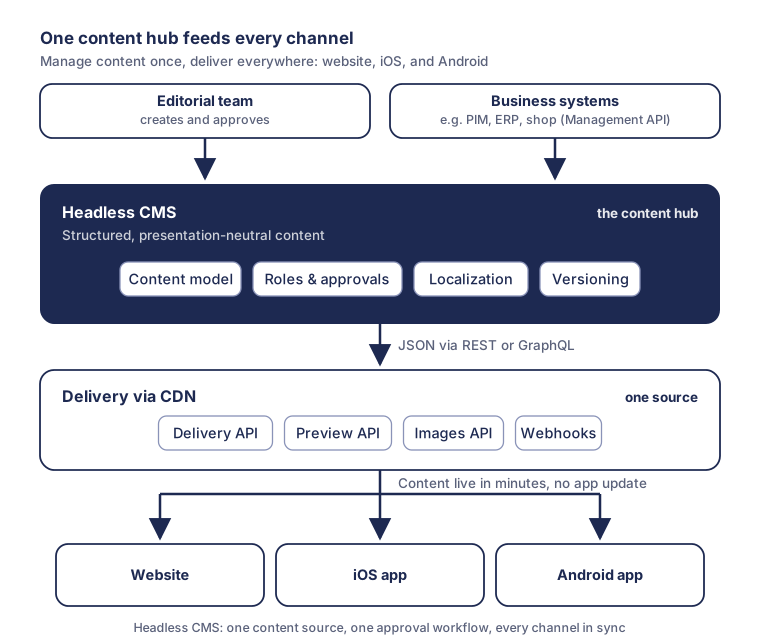
At the centre sits the headless CMS as the content hub, and within it a content model that describes content as types with fields rather than as pages: a product with a name, description, price field and images; an article with a title, teaser and content blocks; a campaign with a run time and banner artwork. Presentation neutrality is what matters: no HTML fragments in text fields, no field names like “left column”, because there is no left column on a smartphone.
Delivery is handled by a delivery API that distributes published content as JSON worldwide via a CDN; at Contentful it is called the Content Delivery API. Alongside it there is typically a preview API for unpublished drafts, a management API for programmatic imports, from a PIM or ERP for instance, and an images API that scales images on the fly and converts them into modern formats such as WebP: the same image source, but the right variants for desktop, tablet and smartphone. With GraphQL, each frontend requests exactly the fields it needs:
query {
  campaign(id: "summer-campaign-2026") {
    title
    teaser
    validUntil
    heroImage {
      url(transform: { width: 800, format: WEBP })
    }
  }
}
The website additionally requests SEO fields, the app only the compact content for its card view; both talk to the same API and the same state of the content. On the app side, official SDKs for Swift and Kotlin help, including caching and offline persistence, so content stays available without a network connection. On the web side, the CMS combines with server-side rendering or static site generation; webhooks automatically trigger new builds or cache invalidations on publication. Localization benefits too: translations are maintained once in the CMS and are immediately available to every channel.
The diagram for this article shows that setup: the editorial team and business systems feed the content hub, and the delivery API distributes via the CDN to the website, the iOS app and the Android app.
Benefits of a headless CMS for web and apps
A headless CMS pays into four goals that concern decision-makers directly: consistency, speed, team productivity and future readiness.
The first gain is consistency through maintaining content once. One piece of content, one approval workflow, one publication moment; a discount campaign goes live at 9 a.m. on all channels at once, without anyone having to keep three systems in sync.
The second is speed. Content changes reach the app in minutes instead of in release cycles, because the store review only stays relevant for what it was meant for: new functionality. Content and code get separate cadences, and marketing no longer has to file a development ticket for a copy fix.
The third is team productivity. The web team, the app team and the backend team work in parallel against the same API and can pick their technology freely; the CMS imposes no framework. For the company that also means a website relaunch does not force a rebuild of the app, and vice versa.
The fourth is future readiness. When a new channel arrives, a customer portal, digital signage in the store or content for voice and AI assistants, a new frontend appears but no new content system. Structured, cleanly modelled content is moreover exactly the format machine consumers can process well; why that is becoming strategically more important is described in our article From SEO and ASO to GEO. That consistent channel experiences also pay off commercially is suggested by a McKinsey analysis cited by Agility CMS: end-to-end omnichannel journeys enable revenue increases of 5 to 15 percent.
An honest assessment: effort and limits
A headless CMS is not a self-runner, and three points belong on the table before a decision is made.
First, the editing experience. A coupled CMS shows the editor the finished page while they work; a headless CMS initially shows form fields. Without countermeasures, acceptance in the content team suffers. The vendors have responded: Storyblok renders a live website preview next to the editor and connects the two through a preview bridge, Contentful offers a preview API for drafts. Such preview setups work well but are project effort you have to plan for; for app previews that goes double.
Second, total cost. The headless CMS does not ship with a website or an app; the frontends have to be built. Anyone running only a marketing website with no app and no further channels on the horizon is often better off with a coupled CMS. The calculation flips the moment the second channel becomes real, because at that point the headless setup is no longer competing with “WordPress” but with “WordPress plus a bespoke app solution plus permanent duplicate maintenance”.
Third, operating model and data protection. SaaS offerings take operations and scaling off your hands, but their cost grows with usage and user numbers, and the location of data processing has to fit your GDPR strategy; Contentful, for example, offers dedicated EU endpoints for this. Self-hosted systems such as Strapi, actively developed with version 5, offer full data sovereignty but require your own hosting, updates and monitoring. Both are legitimate; it should simply be a deliberate decision, including a look at how exportable the content is, to weigh against lock-in risk.
Checklist: how to plan the switch
The following approach has proven itself in practice:
- Channel inventory: which channels exist today, and which are coming in the next 24 months according to the roadmap? Where is content maintained twice today, and what does that cost per month?
- Design the content model: model content as presentation-neutral types with fields, together with the editorial team and development. No HTML blobs, no layout-related field names.
- Settle the API strategy: REST or GraphQL, caching layers, rate limits and a realistic volume estimate for requests from web and app.
- Clarify the app architecture: local caching and offline behaviour, image variants via an images API, defined fallbacks for network errors. No more editorial content in the app code.
- Secure the editorial workflow: preview per channel, roles and approvals, localization, scheduled publication times.
- Decide the operating model: SaaS or self-hosting, data residency, backup concept, and compare costs over three years rather than three months.
- Migrate step by step: start with one content type or one channel, the news section for instance, and only retire the old system once the new path holds.
Conclusion
As soon as a company runs more than one channel, content management is an architecture decision and no longer an editorial question. A headless CMS turns content into what it has to be in a multi-channel world: a centrally maintained, structurally retrievable product that reaches website, iOS app and Android app in the same cadence. Anyone running only a website does not need this rebuild. But anyone running web and app in parallel, or planning an app, should settle the content question before the frontend question; anything else reproduces a duplicate maintenance effort that costs time and trust every week.
Frequently asked questions
What does a headless CMS cost?
The cost is made up of several items: licence or subscription, hosting, introduction and operation. Open-source systems such as Strapi or Payload are free of licence costs but require your own hosting and your own maintenance; SaaS offerings such as Contentful or Storyblok are paid by subscription and scale with user numbers and API volume. The largest item is usually the introduction: content modelling, migration and building the frontends. The figure only becomes reliable once the number of channels and the integration needs are known.
Headless CMS or WordPress: which is the right choice?
For a website alone, with no app and no further channels, a coupled CMS such as WordPress is usually the more economical choice. As soon as an app exists or is concretely planned, the calculation tips, because duplicate maintenance and bespoke app solutions generate permanent cost. One intermediate step is to run WordPress headless through its REST API; that does not, however, replace a content model designed for multi-channel operation.
Who is a headless CMS worth it for?
A headless CMS is worth it for organizations that publish the same content on at least two channels, typically a website plus iOS and Android apps, or that are planning an app in the next 12 to 24 months. The more editorial effort, channels and languages involved, the greater the effect. Anyone permanently running only a website gains little and still carries the higher upfront investment.
Does an app with a headless CMS work offline?
Yes. The app loads content through the delivery API and caches it locally; when the connection drops it shows the last known state and updates on the next connection. Official SDKs support this, and Contentful, for instance, offers offline persistence for its Swift library. What matters is defining the offline behaviour early in the app architecture: what is kept, for how long, and what happens in the event of conflicts?
Sources
- Headless CMS explained: A 2026 guide (Hygraph)
- Headless CMS for Mobile (Hygraph Academy)
- API basics: Content Delivery, Preview, Management, Images and GraphQL API (Contentful Docs)
- Offline persistence with the Swift client library (Contentful Docs)
- Omnichannel Content Delivery: How a Headless CMS Helps (Agility CMS)
- MACH at Different Levels (MACH Alliance)
- Visual Editor (Storyblok Documentation)
- Welcoming Payload to the Figma Team (Figma Blog)
- Releases: strapi/strapi (GitHub)
- REST API Handbook (WordPress Developer Resources)