
App Intents: How Your iOS App Becomes Part of Siri, Spotlight and Apple Intelligence
App Intents is Apple's framework for making an app's actions and content available to the system: to Siri, Spotlight, Shortcuts, widgets and increasingly to Apple Intelligence. This article explains the building blocks of the framework, its maturity after WWDC 2026 and the architecture decisions technical teams should be making now.
 Thorsten Wesseler
“Show me last week’s construction site photos and send them to Lisa.” For Siri to carry out a sentence like that, it has to know two things: which actions your app offers and which content exists inside it. Those two things are exactly what the App Intents framework describes. Apple defines its purpose like this: content and actions should become “discoverable by Apple Intelligence” and support system experiences such as Siri, Spotlight, Shortcuts and widgets.
Unlike Google’s AppFunctions, which we covered in a separate article, App Intents is not an experimental preview. The framework has existed since iOS 16 (2022), runs on all Apple platforms (iOS and iPadOS from 16, macOS from 13, watchOS from 9, visionOS from 1.0) and is production ready today. At WWDC 2026 Apple simultaneously declared it the central building block of the new LLM-based Siri and of “agentic experiences” on iOS. Anyone planning a platform strategy for their own app cannot get around App Intents.
The building blocks: intents, entities, queries
App Intents describes your app to the system through a few clearly defined concepts.
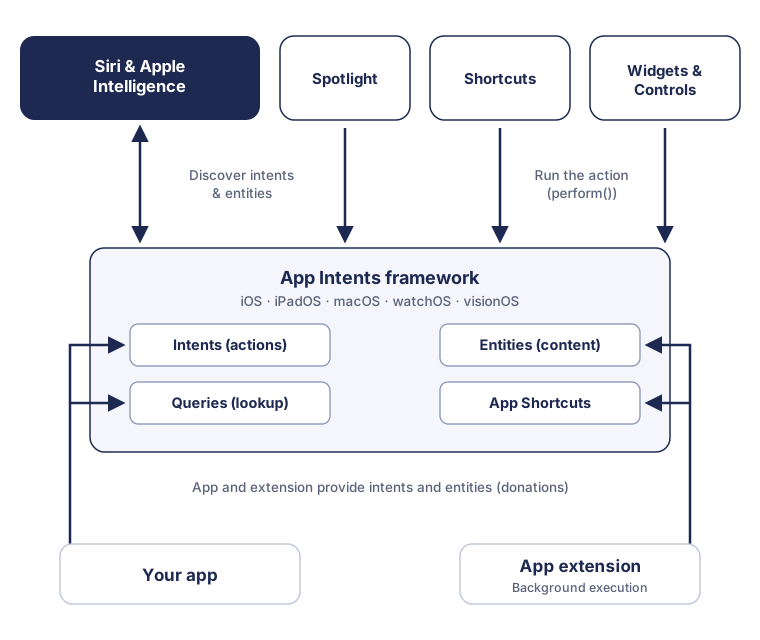
App intents are the actions. An intent is a Swift type that implements the AppIntent protocol: it declares a localized title and a perform() method that executes the action and returns a result or an error. Apple’s design rule here matters: one action per intent, variants via parameters. Instead of separate intents for “play song” and “play album”, there is one “Play Music” intent with a parameter for whatever should be played.
App entities are the content. An entity is a lightweight representation of your data objects with a unique ID, the relevant properties and a description for the system surfaces. Your actual data storage remains the source of truth; the entity is the gateway to it. Apple explicitly recommends exposing only the data types users see and touch, not your entire data model.
Queries connect the two at runtime. Every entity comes with a query object through which the system finds instances, by ID or via search criteria. If the user says “open the document with the draft quote”, Siri resolves that through the query of your document entity, without your app having to be in the foreground.
On top of that there are app enums for finite value lists (status values, for instance), app shortcuts, which make an intent available as a finished, named experience in Siri and the Shortcuts app (AppShortcutsProvider), and snippets: SwiftUI views that an intent can return from perform() so Siri can present results or follow-up questions visually.
Schemas: the shortcut through system domains
Since Apple Intelligence there is a second, strategically important layer: app intent domains with predefined schemas for well-known app categories such as task management, photo editing, email or communication. Instead of defining an intent freely, you conform it via a macro (@AppIntent(schema:)) to a schema that Apple’s models already know from training.
The effect is considerable. First, defining trigger phrases falls away entirely; the system understands natural language variations by itself, and schema intents automatically benefit from future improvements to language processing without any code changes. Second, entity schemas feed the semantic Spotlight index through which Apple Intelligence understands personal context. Third, 2026 added the View Annotations API: views are linked to entities so Siri knows what is currently on screen and can resolve instructions such as “send that to Lisa”.
For decision makers that means: if a schema exists for your app category, adopting it is almost always the right first step. Your own free-form intents remain the route for everything that makes your app unique.
Visible across the whole system, not just in Siri
App Intents is deliberately built as one interface for many surfaces. The same intent definition powers Siri and Apple Intelligence, appears as an action in the Shortcuts app, makes content findable in Spotlight, and sits behind interactive widgets, Controls in Control Center, Live Activities and complications on the Watch. Hardware triggers such as the Action button on the iPhone also invoke app intents.
One mechanism deserves particular attention: donations. Your app tells the system when users perform actions or view content, and supplies entities to the Spotlight index. From these signals the system builds suggestions and contextual understanding. An app that does not donate stays invisible to the system’s suggestion logic, even if its intents are technically well defined.
Architecture: foreground, background and the extension question
As with AppFunctions on Android, the rule is: agents call business logic without a UI. Apple distinguishes two execution paths for this. Intents that need to display something run in the foreground and launch the app when required (via the OpenIntent protocol, for example). Many intents should run in the background though, without opening the app; for those you provide an App Intents extension. Via supportedModes you configure when an intent stays in the background and when it moves to the foreground.
The architectural consequence is the same one we described in the AppFunctions article: core logic belongs in its own Swift package that the app and the extension share. Anyone whose use cases are only reachable through view controllers and views today has the real conversion work ahead of them, not in writing the intent types.
Also worth mentioning is the connection to the Foundation Models framework: App Intents defines which actions are available, and Apple’s on-device models can invoke those actions programmatically. That is Apple’s version of the agentic architecture Google pursues with AppFunctions and Android MCP.
Maturity: stable, testable, strategically upgraded
Unlike with AppFunctions, nobody has to wait for alpha libraries here. App Intents has been in production use for four years, the Shortcuts and widget integrations are established, and since 2026 there is a dedicated App Intents testing framework that makes Siri, Spotlight and Shortcuts integration testable through real system paths, without UI automation. The Apple Intelligence schemas and the new Siri are the more recent part; here it is worth watching the available domains, which Apple keeps extending.
The risk profile is therefore the inverse of Android: on iOS the technology is not the open question, only how quickly the new Siri reaches everyone. The investment in App Intents pays off regardless, because the same work already serves Spotlight, widgets, Shortcuts and the Action button today.
What technical decision makers should do now
Start with a schema comparison. Check whether your app category is covered by an app intent domain. If it is, adopting the schema is the route with the best effort-to-benefit ratio for Siri and Apple Intelligence.
Curate actions and entities. Identify the actions users want to trigger from outside the app, and the data types they reference while doing so. One intent per action, variants via parameters, entities only for visible concepts.
Plan for donations from the start. Intent and entity donations plus Spotlight indexing determine whether the system considers your app in suggestions and in personal context.
Check your architecture for extension readiness. Business logic has to be callable without a UI and organized in a shared package so background intents can run in an extension.
Institutionalize testing. Use the App Intents testing framework to bring Siri and Spotlight paths into CI instead of checking them manually on devices.
Plan across platforms. The selection of functions for App Intents and AppFunctions should come from the same analysis. Anyone serving both platforms defines their app’s “agent surface” once and implements it twice.
Conclusion: on iOS the agentic future is already the present
App Intents is the rare case of a future technology that already pays off today. The same investment makes an app controllable by Siri, findable in Spotlight, usable in widgets and Shortcuts, and ready for LLM-based Siri and Apple Intelligence all at once. On iOS the question is therefore not whether App Intents is worth it, but which of your app’s actions and content to expose first. Anyone who has answered that has also done half the work for Android and AppFunctions.
Sources
- App Intents framework overview (Apple Developer Documentation)
- Getting started with the App Intents framework (Apple Developer Documentation)
- WWDC26 Apple Intelligence Guide (Apple Developer)
- Explore advanced App Intents features for Siri and Apple Intelligence (WWDC26 session)
- Apple Newsroom: Apple aids app development with new intelligence frameworks and advanced tools (June 2026)