
From Lovable to the App Store: How to Turn Your Web App into a Real Native App
The no-code and AI coding revolution is in full swing, and right at the front of it is Lovable. Maybe you have already built your first brilliant-looking application with it. It runs smoothly in the browser, looks great on the phone and the feedback from your first users is positive.
 Thomas Henz
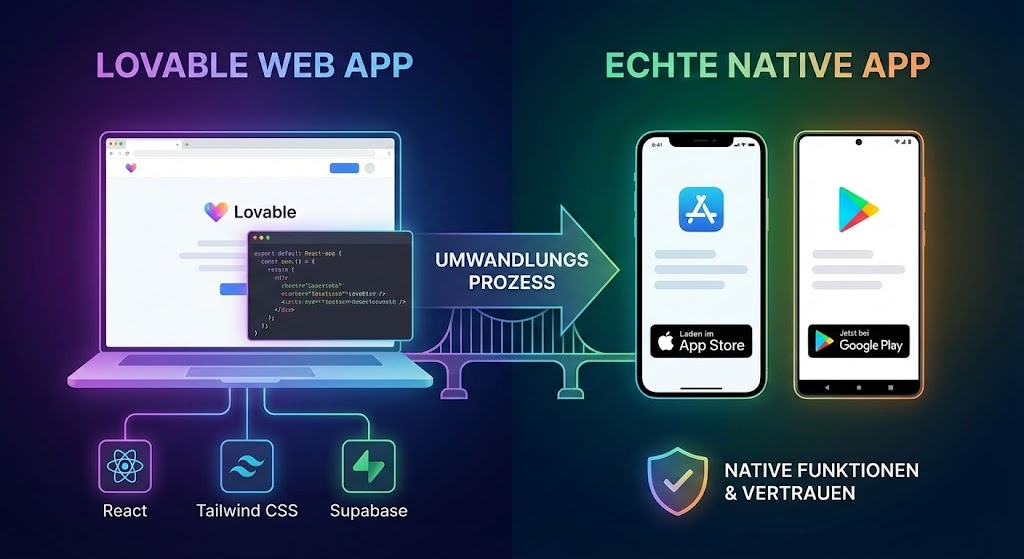
But then comes the inevitable question: “Is this available as an app in the App Store?”
In this article I will show you what Lovable actually is, why the step to a native app (iOS & Android) can be decisive for your business, and which hurdles you have to clear along the way.
What is Lovable?
To understand how we get to the app, we need to understand what we are dealing with.
Lovable (lovable.dev) is one of the most advanced AI tools for software development. Unlike classic site builders, Lovable generates real, clean code - usually based on a modern tech stack:
- React (for the frontend)
- Tailwind CSS (for the design)
- Supabase (for database and backend)
The result is a so-called web app. That means it lives in the browser (Chrome, Safari, Firefox). When you click “Publish”, you get a URL. That is fantastic for quick MVPs (minimum viable products), but technically speaking it is not a native app that can be downloaded and installed.
Why isn’t the web app enough? (Why native?)
You could say: “My users can simply add a bookmark to their home screen.” That is technically true, but in the reality of the German and international markets there are compelling reasons for a real native app (.ipa for iOS, .apk/.aab for Android):
1. Trust and discoverability (SEO in the store)
The Apple App Store and the Google Play Store are huge search engines. Many users do not search for solutions on Google, but directly in the store.
- Psychology: an app in the store appears more credible and more “finished” than a mere website.
- Market: especially in the DACH region (Germany, Austria, Switzerland), skepticism towards unknown links is high. A reviewed app in the store builds trust.
2. Push notifications
This is often the main reason. With a pure web app (on iOS) it is still difficult to impossible to send reliable push notifications while the app is not open.
Do you want to bring users back into your app (“retention”)? Then you need push.
3. Native features & performance
Real apps have deeper access to the hardware:
- Biometrics: login via FaceID or fingerprint.
- Camera & sensors: faster access than through the browser.
- Haptics: the “feel” of the app is often smoother.
The hurdles: from React to Swift/Kotlin?
Here lies the problem: Lovable produces React code. Native apps, however, are traditionally written in Swift (iOS), Kotlin (Android) or Flutter (cross-platform).
So does everything have to be rewritten? No. But there are hurdles you need to know about.
Hurdle 1: the “container” (wrapper)
Since your code is made for the browser, you need a translator. For that there are solutions like Capacitor (by Ionic) or bequem.app if you really want nothing to do with the technical side.
Capacitor takes your Lovable web code and wraps it in a native container.
bequem.app does that too, but the service is fully managed, meaning you do not have to take care of the implementation.
To the App Store it looks like a native app, while inside your web technology keeps running.
Hurdle 2: Apple & Google guidelines
The stores are strict. They do not accept apps that are just “packaged websites”.
- Your app has to feel like an app (no page reloads on click).
- Offline it must at least show an error message and must not stay blank.
- Apple rejects apps that offer “insufficient added value” over a mobile website (guideline 4.2).
That is why I definitely recommend implementing push notifications as well.
Hurdle 3: the deployment process
Once all the technical work is done, the part that is often most painful for web developers begins:
- Accounts: you need an Apple Developer account (99€/year) and a Google Play Console account (one-time 25$).
- Certificates & signing: apps have to be digitally signed. For that you have to work with Android Studio and Xcode.
- Review process: your app is reviewed by real people at Apple. That can take days and lead to rejections you have to fix.
This step can be very tedious, and if you have no appetite for it, that is completely understandable. In that case a solution like bequem.app would be, well, convenient for you :)
Conclusion: is the effort worth it?
Absolutely. If you have built a product with Lovable that solves real user problems, the step to a native app is the next logical milestone for professionalisation and growth.
The path is no longer as rocky as it used to be. Thanks to tools like Capacitor and full-service app solutions like bequem.app, you can reuse 95% of your Lovable code. So you are not building two apps, but one codebase that runs everywhere.
Technical solutions like Capacitor cost time and nerves. And technically it is absolutely doable if you feel like it and have some basic knowledge of app development.
If you want to save time and do not want to deal with the technical side, I recommend a managed service like bequem.app.
Summary of the steps with Capacitor
- Export the code from Lovable (via GitHub).
- Install Capacitor in the project.
- Configure the project for iOS (Xcode) and Android (Android Studio).
- Create the build and upload it to the stores.
Summary of the steps with bequem.app
- Fill in the form on the bequem.app website.
- Have a short call with your contact person.
- Launch the app together.