
Improving Your App Rating: How to Get More and Better Reviews
The stars in the store are the first thing prospective users see of your app, and often the reason they do not install it. Yet much of the common advice on getting better ratings is outdated or breaks the rules set by Apple and Google. This article shows how the stores calculate the rating, when and how to ask for ratings within the rules, and how to deal with criticism.
 Thomas Henz
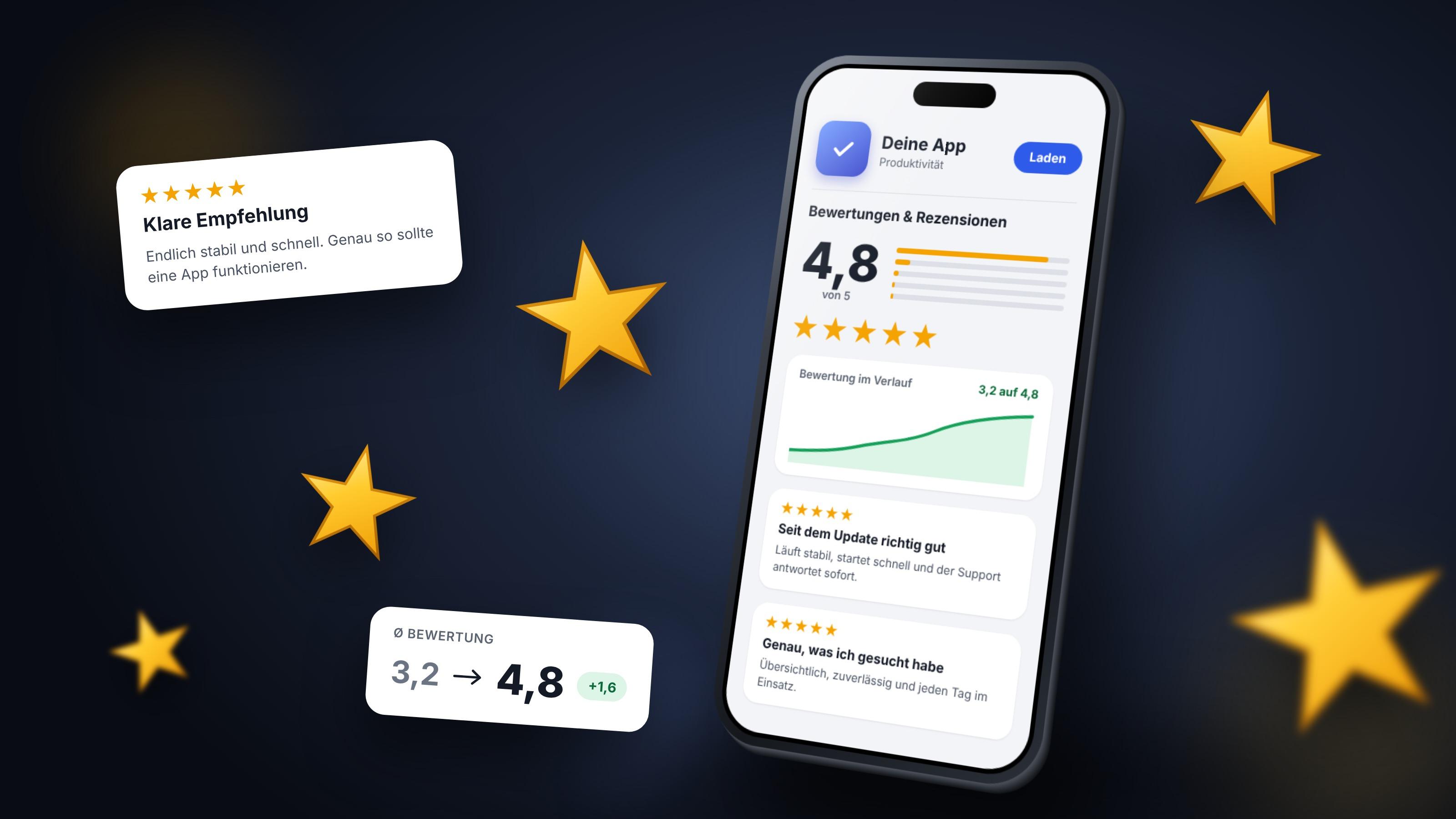
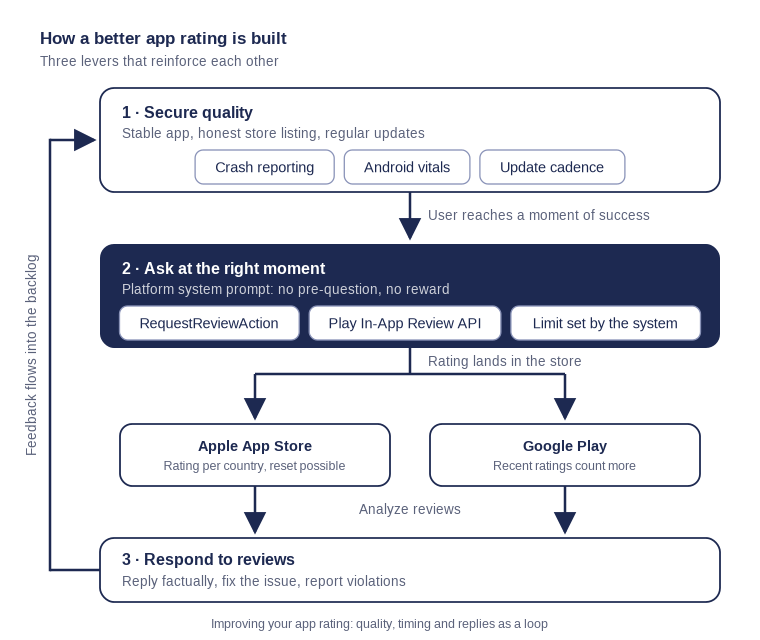
A better app rating comes from three levers: a stable app, a review request made at the right moment through the official system prompts from Apple and Google, and consistent replies to criticism. According to the AppTweak report 2025, apps that improved from 3.6 to 4.2 stars converted almost 60 percent better. Rewards and upstream sentiment checks, by contrast, violate the store rules.
An example of how it plays out in many companies: the fictional bakery chain Kornblum runs a pre-order app. After a faulty update, the payment flow crashes on older Android devices, and the rating on Google Play drops from 4.4 to 3.4 stars. Marketing responds with a pop-up at app launch: “Do you like our app? Get a free bread roll for 5 stars.”
Well meant, but wrong on two counts. The pre-question and the reward violate Google Play’s policies, and the timing hits users before they have accomplished anything at all. The actual problem, the crash, remains unsolved.
Why does the app rating decide visibility and downloads?
The app rating works in two ways: it influences how many visitors to your store listing install the app, and it helps determine whether the app shows up in search and recommendations at all.
To clarify the terms: the app rating is the star rating from 1 to 5 that users give in the store. Apple and Google condense all individual ratings into an average that appears on the product page and in the search results. A review is the written comment that users can add to their star rating.
The benchmark reports from AppTweak show how strong the lever is. In the 2025 report (data basis: the top 1,000 apps in the US in 2024), apps that improved from 3.6 to 4.2 stars achieved a conversion rate almost 60 percent higher.
The 2026 report (data basis 2025) shows the second effect: around 95 percent of the apps featured on the App Store have at least 4.0 stars, and 65 percent even have 4.6 or more. On Google Play, about 96 percent of featured apps sit at 4.0 stars or above.
A connection shows up in search as well. According to AppTweak (2026), apps with 4 stars ranked in the top 10 of the App Store for an average of 4.4 keywords, apps with 3 stars for only 2.2. AppTweak itself points out that this is a correlation; better-rated apps are often also larger and more mature.
Google confirms the mechanism in principle: according to the Play team (2021), ratings feed into featuring and placement in the Play Store. For your planning, this means: every visitor you bring to the store listing through a campaign meets the stars first.
How do the App Store and Google Play calculate the rating?
Both stores show an average, but they calculate it differently: Apple summarises the individual ratings since the last reset, while Google gives more weight to recent ratings. Anyone serving both platforms therefore needs two slightly different strategies.
On the App Store, the summary rating applies per territory, that is, per country or region. One special feature: with a new release, you may reset the summary rating. The written reviews remain visible. Apple recommends using the reset sparingly, because a low number of ratings can deter prospective users from downloading.
Google Play does not offer a manual reset. Instead, the store has weighted recent ratings more heavily since August 2019, so that the rating reflects the current state of the app; Google does not publish the exact formula. Since November 2021, users on phones have also seen the rating for their country. For tablets, Chromebooks and wearables, Google announced device-specific ratings from 2022 onwards.
| Feature | Apple App Store | Google Play |
|---|---|---|
| Calculation | individual ratings since the last reset | recent ratings count more |
| What users see | rating per territory | rating per country and device type |
| Reset | possible with a new release, reviews remain | not provided |
| Limit for the review prompt | at most 3 displays per app in 365 days | time-bound quota, value not published |
| Official API | StoreKit: RequestReviewAction, AppStore.requestReview(in:) | Play In-App Review API (ReviewManager) |
| Replying to reviews | App Store Connect or App Store Connect API | Play Console or Reply to Reviews API, maximum 350 characters |
The practical consequence: on Google Play, improvements pay off quickly, but drops in quality show through just as quickly. On the App Store, old ratings linger for longer; there, a reset can make sense after a major leap in quality.
When and how do you ask for a rating?
Ask after a moment of success, through the platform’s system prompt, and rarely. A moment of success is the instant in which a user has just achieved a goal with the app: the completed order, the booked ticket, the cleared level.
Apple sets out clear rules in the Human Interface Guidelines. Only ask for a rating once users have demonstrably engaged with the app, so not on first launch and not during onboarding. Do not interrupt a task in progress, and leave at least one to two weeks between two requests.
Technically, on iOS you use the system prompt from StoreKit: RequestReviewAction in SwiftUI, AppStore.requestReview(in:) in UIKit. The older class SKStoreReviewController has been marked as deprecated since iOS 18. The system displays the prompt at most three times per app in 365 days, and users can switch off such requests for all apps in Settings.
The decision about when your app requests the prompt is yours. An example in SwiftUI, based on Apple’s sample project:
@Environment(\.requestReview) private var requestReview

func orderCompleted() {
    successfulOrders += 1
    let newVersion = currentVersion != lastPromptedVersion

    // Only after three successes, only once per app version,
    // never in a session with a crash or an error
    if successfulOrders >= 3, newVersion, !errorInSession {
        requestReview()
        lastPromptedVersion = currentVersion
    }
}
On Android, the counterpart is the Play In-App Review API (library com.google.android.play:review, currently version 2.0.2). requestReviewFlow() returns a ReviewInfo object, and launchReviewFlow() starts the prompt. The API does not reveal whether the prompt appeared or whether a rating was given; your app simply carries on afterwards.
Important for both platforms: do not attach the system prompt to a button such as “Rate now”. Because of the limits it may not appear, and the button looks broken. For a menu item like that, link directly to the store listing, on Apple with the URL parameter action=write-review.
Which common tips violate the store guidelines?
Three frequently recommended tactics are risky: rewards for ratings, upstream sentiment checks and self-built review prompts. All three can still be found in guides today, even though Apple and Google explicitly prohibit them.
Rewards and prize draws. Google Play prohibits asking users for a rating and offering an incentive in return, such as a discount. Apple treats paid, incentivised, filtered or fake feedback as manipulation; the consequence can go as far as expulsion from the Apple Developer Program.
In Germany, competition law comes on top: on 20 June 2024, the Higher Regional Court of Frankfurt (OLG Frankfurt, case no. 6 U 128/23) classified advertising with reviews obtained through a prize draw, without clear labelling, as misleading. Have such campaigns legally reviewed case by case.
Review gating. Review gating is the practice of asking users about their satisfaction before the review request and sending only the satisfied ones to the store. Dissatisfied users end up in an internal form. Google prohibits any question before or during the review prompt, explicitly including opinion questions such as “Do you like the app?”. At Apple, such a pre-selection is likely to count as filtered feedback, which the guidelines treat as manipulation.
Custom review prompts. In guideline 5.6.1, Apple requires the use of the provided API and states that custom review prompts will be disallowed. Google requires the review card to be displayed unchanged, without an overlay and without adjusting its size or design. Under Apple’s guideline 3.2.2, it is likewise not permitted to unlock features only after a rating.
The permitted alternative achieves the same goal without breaking the rules. Instead of questioning users, you evaluate behavioural signals: completed transactions, recurring usage, no errors in the session. And instead of diverting dissatisfied users, you permanently offer a clearly visible feedback channel in the app, independent of any review request.
Why does a good rating start with technical quality?
No timing, however good, makes up for an unstable app: anyone asking for ratings while the app is crashing mostly collects bad ones, and Google Play additionally lowers visibility when quality is poor. Both stores treat quality and rating as signals that belong together.
Google makes this measurable with Android vitals. Android vitals is the quality dashboard in the Play Console that records stability and performance on real devices. Fixed thresholds apply to two core metrics: the user-perceived crash rate should stay below 1.09 percent, the user-perceived ANR rate below 0.47 percent. An ANR (Application Not Responding) is a state in which the app no longer responds to input.
Anyone exceeding the thresholds risks reduced visibility in the Play Store. In addition, there is a limit of 8 percent per phone model; above it, Google has been able to display a warning on the store listing since 30 November 2022. The Kornblum case from the introduction would have stood out exactly here: a crash that affects only older devices.
Apple puts it qualitatively in the App Review Guidelines (section 5.6.4). Excessive customer complaints, for example in the form of negative reviews, are regarded as an indicator that an app does not meet quality expectations. This can factor into the assessment of whether a developer is complying with the Developer Code of Conduct.
In practice, this results in an order of priorities. First comes crash reporting from the very first release, then a fixed update cadence, then the review request. Because Google Play weights recent ratings more heavily, a fixed bug shows up in the visible rating there comparatively quickly.
Quality also includes an honest store listing: screenshots and descriptions should promise only what the app actually delivers.
How do you deal with negative reviews?
Reply factually, fix the issue described and report only genuine rule violations. Negative reviews cannot be deleted, but they can often be turned around.
Google puts a number on the effect: according to the Play Console, replying to a negative review raises its rating by 0.7 stars on average. On the App Store, users are notified of your reply and can then update their review. Apple advises that, when resources are tight, you should first respond to the lowest ratings and to reports of technical problems in the current version.
Both platforms set limits on tone. Apple requires respectful replies that relate to the comment and contain neither personal data nor advertising. Google prohibits asking for a higher rating in the reply. A good reply names the problem, states the solution or the next step and points to a support contact.
After a fix, a second pass is worthwhile. On the App Store, you can edit your reply at any time and point to the corrected version; in App Store Connect, you can set up an email notification for when a user changes a review you have replied to. On Google Play, the user receives a notification only for your first reply.
You report abusive reviews, spam or other rule violations via “Report a Concern” in App Store Connect or via the reporting function in the Play Console. No store removes criticism simply because you do not like it.
For larger apps, replying belongs in the support systems: Google offers the Reply to Reviews API for this, Apple the customer review resources of the App Store Connect API. Google does, however, advise against automated replies.
One more reason for careful replies: Apple now uses a large language model to summarise reviews into a short paragraph on the product page, so far in English in the US and eight further storefronts.
In practice: your roadmap to a better rating
The following steps build on one another; steps 3 to 5 directly affect the architecture of your app.
- Measure the starting point: Evaluate the rating per country in App Store Connect and the Play Console; group the topics of the 1- and 2-star reviews.
- Secure stability: Set up crash reporting and agree on the Android vitals thresholds of 1.09 percent (crashes) and 0.47 percent (ANRs) as fixed quality targets.
- Define the moment of success: Specify one or two events that mark real value and record them as events in the app.
- Encapsulate the request logic: A dedicated module decides based on the event counter, app version, last request and whether the session was error-free. Put the thresholds into a remote configuration in the backend so that you can adjust them without a new app release.
- Integrate the system prompts:
RequestReviewActionon iOS, the Play In-App Review API on Android; no custom prompt, no pre-question, no reward. - Offer a feedback channel: Set up a permanent menu item for feedback and support, plus a direct link to the store listing for everyone who wants to rate the app of their own accord.
- Establish a reply process: Agree on responsibility, response time and tone; update replies after every relevant fix.
- Weigh up a reset: On the App Store, reset only after a clear leap in quality and factor in the loss of the rating count.
Conclusion
The app rating is not a marketing trick but the public result of your product quality and your processes. Anyone trying to take a shortcut with rewards, upstream questions or custom prompts risks sanctions from the stores and, in case of doubt, a formal warning under competition law. The sustainable path is unspectacular: a stable app, a cleanly encapsulated request at the moment of success through the system prompts, and a reliable reply process. These three building blocks reinforce each other, and they can be planned, measured and improved with every release.
Frequently asked questions
What is an app rating?
The app rating is the average star rating of an app on the Apple App Store or on Google Play, formed from users’ individual ratings on a scale from 1 to 5. It appears on the product page and in the search results. Apple calculates it per territory, while Google Play weights recent ratings more heavily and displays it per country and device type.
How often may an app ask for a rating?
On iOS, the system displays the review prompt at most three times per app within 365 days, regardless of how often the app requests it. Google Play works with a time-bound quota whose value is not published; according to Google, several calls within a month do not reliably result in a prompt. Apple additionally recommends leaving one to two weeks between two requests.
Are you allowed to reward users for a rating?
No. Google Play explicitly prohibits incentives such as discounts, vouchers or bonuses for ratings. Apple treats incentivised feedback as manipulation that can lead to expulsion from the Developer Program. In Germany, competition law comes on top: in 2024, the Higher Regional Court of Frankfurt judged advertising with reviews from a prize draw, without clear labelling, to be misleading.
Can you have negative reviews deleted?
Only if they violate the store’s rules, for example through insults or spam. You report such reviews in App Store Connect via “Report a Concern” or in the Play Console. Justified criticism stays. A factual reply is more effective: according to Google, the rating of a negative review that received a reply rises by 0.7 stars on average.
How quickly can a poor rating be improved?
That depends on the store. A worked example for a simple average: an app with 400 ratings and 3.6 stars needs 300 additional 5-star ratings to reach 4.2. On Google Play it goes faster, because recent ratings count more. On the App Store, resetting the summary rating after a major update can speed up the fresh start.
Sources
- Ratings, reviews, and responses (Apple Developer, as of 2026)
- Human Interface Guidelines: Ratings and reviews (Apple, as of 2026)
- Requesting App Store reviews (Apple StoreKit documentation, as of 2026)
- SKStoreReviewController Deprecated: What’s the UIKit replacement? (Apple Developer Forums)
- App Review Guidelines, sections 3, 3.2.2, 5.6.1 and 5.6.4 (Apple, as of 2026)
- Customer Reviews (App Store Connect API, Apple)
- Google Play In-App Reviews API (Android Developers, as of 2026)
- Integrate in-app reviews: Kotlin or Java (Android Developers, as of 2026)
- View and analyze your app’s ratings and reviews (Play Console Help)
- Ratings, Reviews, and Installs policy (Google Play Developer Policy Center)
- Ratings and reviews in Play Console (Google Play)
- Reply to Reviews API (Google Play Developer API)
- Android vitals: core vitals and thresholds (Android Developers)
- Raising the bar on technical quality on Google Play (Android Developers Blog, 2022)
- Making Ratings and Reviews better for users and developers (Android Developers Blog, 2021)
- New app rating formula headed to Google Play (Search Engine Land, 2019)
- Google Play is changing how app ratings work (TechCrunch, 2019)
- ASO trends & benchmarks report 2025 (AppTweak)
- ASO & Apple Ads trends and benchmarks report 2026 (AppTweak, July 2026)
- Higher Regional Court of Frankfurt: reviews obtained through prize draws are misleading (IT-Recht Kanzlei, 2025, in German)